By TopicBin .
Updated .
4 min read .
0 comments
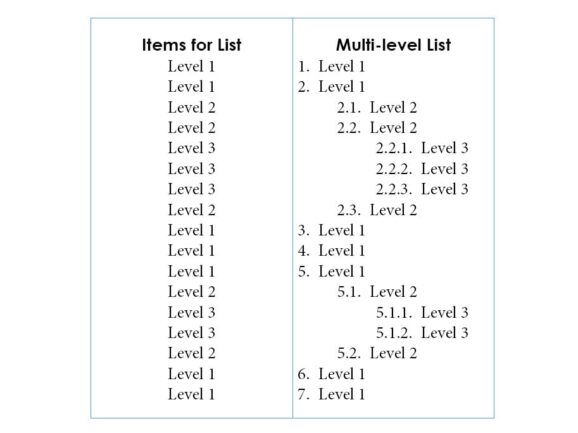 A multi-level list is also known as a multi-level outline because it resembles an outline. In a multi-level list, a list item contains one or more lists, thereby creating hierarchical relationships between them. A multi-level list can be as deep as nine levels.
Defined list and
A multi-level list is also known as a multi-level outline because it resembles an outline. In a multi-level list, a list item contains one or more lists, thereby creating hierarchical relationships between them. A multi-level list can be as deep as nine levels.
Defined list and
By TopicBin .
Updated .
3 min read .
0 comments
 Lists are very important in document formatting. They can be either bulleted or numbered, and they automatically update as you add or remove items.
These are the few methods to create bulleted or numbered lists in InDesign.
Convert existing list items to bulleted or numbered lists: Select
Lists are very important in document formatting. They can be either bulleted or numbered, and they automatically update as you add or remove items.
These are the few methods to create bulleted or numbered lists in InDesign.
Convert existing list items to bulleted or numbered lists: Select
By TopicBin .
Updated .
5 min read .
0 comments
The process of connecting text among different text frames is called threading text. A text frame is a concept similar to a text box. However, a text frame can be independent of the other text frame or be connected. Note also that text within the
By TopicBin .
Updated .
3 min read .
0 comments
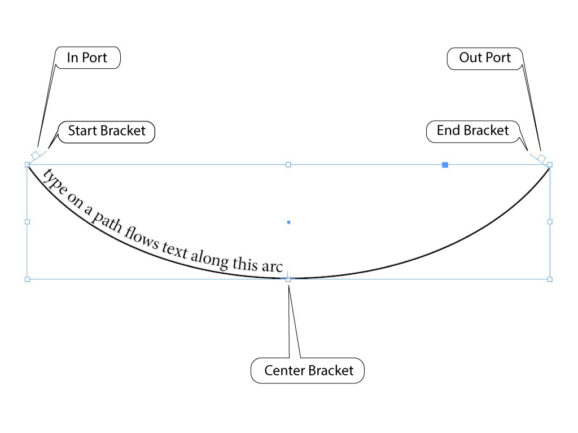 Path refers to a geometrical shape made up of points and lines. Geometrical shapes include rectangles, circles, triangles, polygons, lines, arcs, angles, and so on. While rectangles, circles, triangles, and polygons are closed shapes, lines, arcs, and angles are the opened shapes. Therefore, a path
By TopicBin .
Updated .
3 min read .
0 comments
It is beneficial to add page numbers in long documents. You need a page number marker to display the page numbers in a document. When you add a page number marker, page numbers automatically update when you add, update, or delete document pages. Generally, we